Sorting on the manufacturing queue
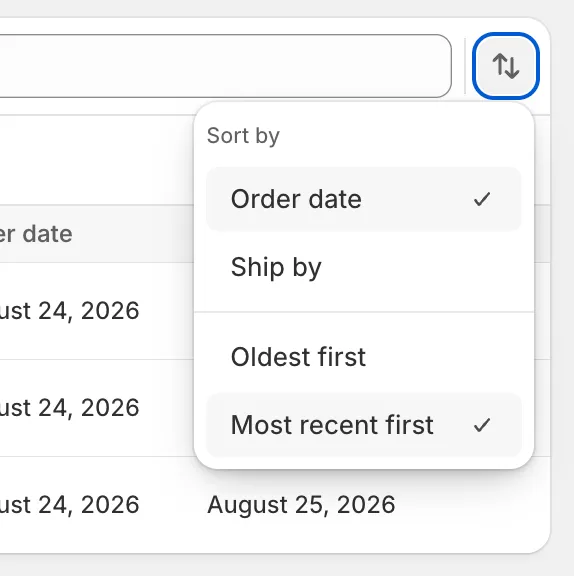
The manufacturing orders index sorted one way and one way only: most recent first. Fine for small queues, a problem when you’re working from the ship-by date and the promise that matters isn’t the newest order, it’s the sequence the whole floor has to run.
A sort button beside the filters now opens a Sort by popover with two choices of column: Order date or Ship by. Each column carries a direction choice made for the question you’re actually answering: Oldest first / Most recent first on order date, Soonest due first / Latest due first on ship-by. The sort carries across pagination, tabs, and location switches, so once you pick a direction it sticks until you change it.
Added
- A sorting button on the manufacturing orders index that opens a Sort by popover with the working columns and direction.
- Order date and Ship by as the two sortable columns.
- Four direction labels in total: Oldest first and Most recent first for order date, Soonest due first and Latest due first for ship-by.
Changed
- Previously the index always sorted by order date, most recent first. The same default still runs, but it’s one of the sortable options now instead of a fixed ordering.
- Sort carries across anything that narrows the list — tabs, filters, and location. Deselecting a filter or switching a location doesn’t reset the sort.