Customisations
Plenty of production work isn’t made-to-order in the strict sense. The ring already exists in a drawer; someone still has to engrave it before it ships. The hoodie is stocked in four sizes; the embroidery on the back is what takes two days.
Customisations are how Orderkraft handles that. A product you’d otherwise call regular stock gets a manufacturing order when, and only when, a customer actually personalises it. This page covers how that works; Set up product customisations is the step-by-step.
Where the data comes from
When a customer personalises something on your storefront, the choice ends up as a line item attribute on the order: a key and a value, like Engraving and Anna & Tom, 2026. Your product options app writes it, or your theme does, or a bundle builder does. Orderkraft doesn’t collect that data and doesn’t care which app produced it. It reads what’s on the line.
The problem is that line item attributes are a junk drawer. A real order line carries the engraving text the customer typed, and also _has_gpo, _bundle_id, and whatever else the apps in your stack decided to stash there. Production needs the first one. Nobody on the floor needs the rest.
Customisation intents
A customisation intent is you telling Orderkraft which attributes are real. It has two parts. The code has to match the line item attribute key exactly, character for character, capitals and spaces included. The name is what your production team reads.
The name is the point of the whole thing. Storefront apps produce keys like custom_engraving_1 or Personalisation-Line-1, because they were named by whoever built the form rather than by whoever has to read them six months later. Your intent turns that into Engraving, and that’s the label that shows up on the manufacturing order.
There’s an optional description as well. It’s for your own notes and never leaves Orderkraft.
Intents live at Settings → Customisation intents and apply to the whole shop, not to individual products. One intent named Engraving covers every product you engrave.
How a match happens
Three things have to line up before Orderkraft records a customisation:
- The product is in Orderkraft, and marked customisable on its product page
- The order line carries a custom attribute
- That attribute’s key is identical to an intent’s code
Miss any one and nothing happens. That’s deliberate. Match on the key alone and every stray _bundle_id becomes production work. Drop the customisable flag and one typo’d intent code starts pulling in lines from products you never meant to touch.
Matching only looks at the key. The value is whatever the customer typed, and Orderkraft records it as-is.
What a match does
Orderkraft creates a manufacturing order for that line and records the customisations on it, each one labelled with its intent’s name and carrying the value from the order.
That manufacturing order is a normal one. It has a number, a status, a location, holds, and a timeline. It shows up in the production queue, in the block on the Shopify order page, on the customer’s order status page, and in Flow triggers. Nothing about it is second-class because the product wasn’t built from raw materials.
The difference is what’s inside it. A made-to-order manufacturing order lists the materials to consume. A customisation-only one has no inputs, because there’s nothing to consume. It carries the instruction instead.
A line can have several customisations if it matched several intents. Each attribute is recorded once per manufacturing order, listed under the product it belongs to.
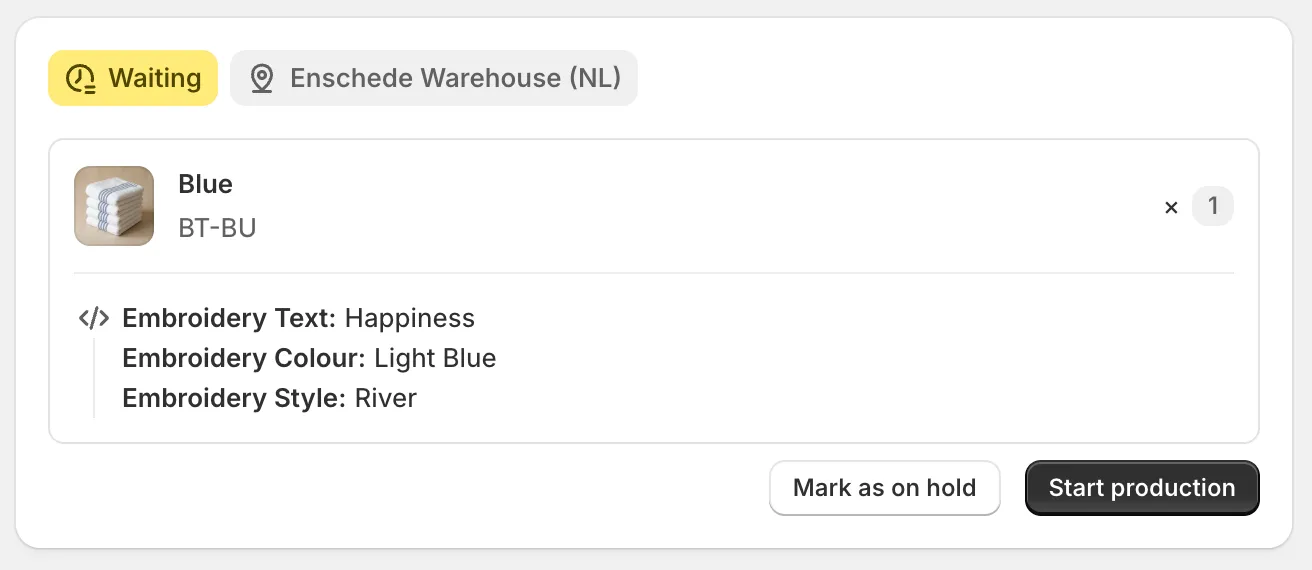
Three matched intents, and none of the internal keys that came in on the same line.
Whoever picks this up needs the text, the colour, and the style. The rest of what was on that order line doesn’t change what they do, so it isn’t shown.
What doesn’t produce a manufacturing order
Orderkraft skips a line when it has nothing to build: an empty bill of materials and no customisation match. A stocked t-shirt with no personalisation on it stays a stocked t-shirt, and the order line passes through untouched.
That means having a product in Orderkraft isn’t on its own enough to put every future order for it in the queue. Something has to be produced for that line specifically.
Deleting an intent
Deleting an intent doesn’t delete the customisations already recorded from it. Those stay on their manufacturing orders and fall back to showing the raw attribute key instead of the name.
That’s the honest option. Production history shouldn’t rewrite itself because someone tidied up the settings six months later, and the raw key is still enough to work out what the order asked for.
What this means for shipping
A product in Orderkraft is flagged as made-to-order on your Shopify store, whether or not it has a bill of materials behind it. That’s what split shipments reads to decide what to hold back and what to send now, and it’s what the lead time block reads on the product page.
So a stocked product you add for customisation gets treated like made-to-order at checkout. Usually that’s what you want, since it has to go through production before it ships. The catch is the lead time, which is worth setting properly rather than leaving at whatever it was created with.